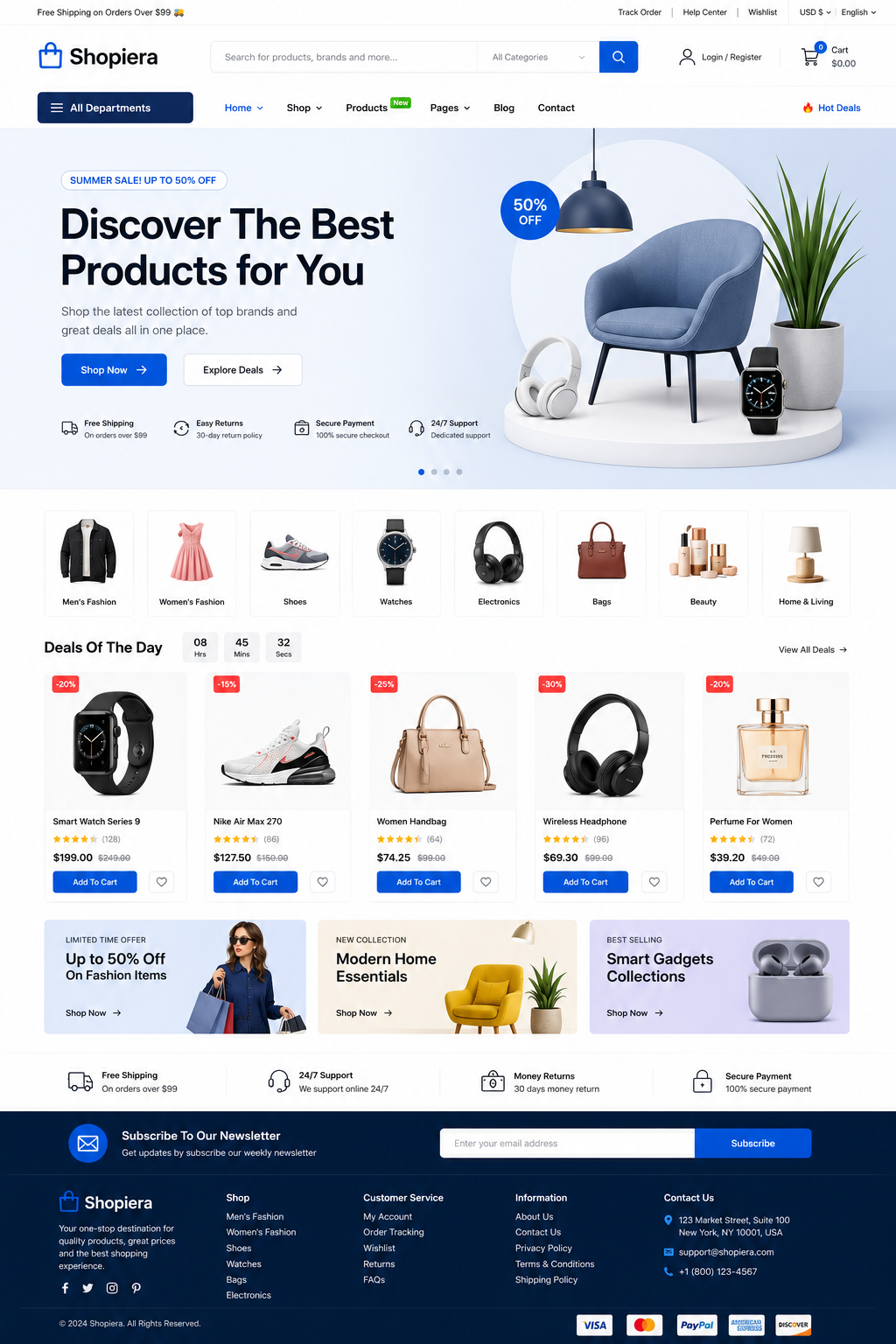
Description
Premium WooCommerce Theme Review
Shopiera WooCommerce Premium Theme: 15 Powerful Benefits for a Successful Store
The Shopiera WooCommerce Premium Theme gives online sellers a professional foundation for presenting products, organizing categories and creating a smoother shopping experience. This practical guide explores its key benefits, ideal use cases, setup process and important points to check before buying.
Quick overview
- Best for: WooCommerce stores that need a modern, multipurpose design
- Possible store types: Fashion, electronics, beauty, furniture and digital products
- Required platform: A self-hosted WordPress website with WooCommerce
- Primary benefit: A ready-made design foundation that can reduce setup time
What Is the Shopiera WooCommerce Premium Theme?
The Shopiera WooCommerce Premium Theme is a premium WordPress theme intended for websites that use WooCommerce to sell products online. WooCommerce manages essential store functions—including products, prices, inventory, carts, checkout and orders—while Shopiera controls the storefront’s appearance and layout.
This difference is worth understanding. Shopiera is not a replacement for WooCommerce. It is the visual and structural layer that presents WooCommerce information to shoppers in a clear, attractive format.
A well-designed premium theme can save considerable setup time by supplying layouts for important areas such as the homepage, product archives, individual product pages, shopping cart, checkout, customer account, blog and contact page. Instead of designing every template from the beginning, you can customize an existing foundation with your branding and content.
Why Choosing the Right WooCommerce Theme Matters
An e-commerce theme needs to do more than create an attractive homepage. Customers must be able to search for products, explore categories, compare options, understand prices and complete checkout without unnecessary confusion.
If the navigation is unclear, product information is difficult to read or the mobile layout is awkward, visitors may leave before purchasing. A suitable theme can support a better customer journey through:
- Clear menus and product categories
- Readable product information
- Visible calls to action
- Mobile-friendly layouts
- Consistent branding
- Simple cart and checkout pages
- Useful customization controls
- A performance-conscious structure
The right choice is not automatically the theme with the most effects. It is the one that supports your products, brand and customers without making the store unnecessarily complicated.
Explore the Shopiera WooCommerce Premium Theme Before You Decide
View the homepage, product pages, mobile menu, cart and checkout in the live demonstration.
15 Powerful Benefits of the Shopiera WooCommerce Premium Theme
1. Professional E-Commerce Design
A professional design can make products easier to explore and help a new business create a more established first impression. Shopiera provides a modern store foundation that can be personalized with your logo, colours, banners and original photography.
2. WooCommerce-Focused Layouts
Shopiera is designed around the familiar WooCommerce shopping journey. It can present product listings, variations, prices, sale information, stock status, customer reviews and related products using organized store layouts. The exact features available will also depend on your WooCommerce settings and extensions.
3. Responsive Mobile Experience
Customers frequently discover and buy products using smartphones. A responsive theme adapts its columns, images, menus and buttons to different screen sizes. Shopiera can provide that responsive foundation, but the finished store should still be tested on several real phones and tablets.
4. Customizable Homepage
A useful homepage quickly explains what your store sells and guides visitors toward important categories or products. Depending on the Shopiera version, the homepage may support hero banners, featured categories, new arrivals, best sellers, special offers, testimonials, articles and newsletter sections.
5. Attractive Product Presentation
Product pages should give customers enough information to make a confident decision. Shopiera can organize titles, galleries, prices, variations, descriptions and add-to-cart controls into a familiar format. Clear photography and original descriptions remain essential.
6. Clear Search and Navigation
Good navigation reduces the time required to find a product. A visible search bar, well-planned menu and logical category hierarchy can improve usability. Larger catalogues may also benefit from filters for price, colour, size, brand or other attributes.
7. Organized Product Categories
Shopiera can present categories through menus, grids and promotional banners. A fashion store might separate clothing, footwear and accessories, while an electronics store could organize phones, computers and appliances. Simple categories help both people and search engines understand the catalogue.
8. Familiar Cart and Checkout Design
The cart should display selected items, quantities, prices and totals clearly. Shopiera styles WooCommerce cart and checkout pages, while payment methods, shipping rules and checkout fields are normally controlled by WooCommerce and compatible plugins.
9. Flexible Header and Footer
A useful header commonly includes a logo, menu, search, account link and cart icon. The footer can display policies, support information, contact details, social links and payment information. Check which header and footer controls are included in your version of Shopiera.
10. Brand Colour and Typography Options
Consistent colours and fonts help the website feel connected to your business. Use a primary brand colour for buttons and important links, choose readable typography and avoid overwhelming shoppers with too many visual styles.
11. SEO-Friendly Foundation
The Shopiera WooCommerce Premium Theme can provide a structured foundation for headings, navigation and product content. However, no theme can guarantee rankings. SEO also depends on useful content, original product descriptions, internal links, image optimization, performance and trustworthy backlinks.
12. Performance-Conscious Structure
A streamlined theme can support faster loading, but the final result also depends on hosting, image sizes, plugins, fonts, scripts, caching and database health. Test a complete Shopiera demo instead of judging performance from a blank installation.
13. Page-Builder Compatibility
If your Shopiera package officially supports Elementor, Gutenberg or another builder, you may be able to edit sections visually without writing code. Confirm the builder used for the demonstration because layouts created for one builder are not always editable through another.
14. Support for Different Markets
WooCommerce can handle different currencies, taxes, payment methods and shipping rules. Translation and multi-currency functionality may require additional plugins, so verify which solutions have been tested with Shopiera before building an international store.
15. Documentation, Updates and Support
Clear documentation can make theme installation, demo import and customization much easier. Before purchasing, confirm the current version, update period, support duration, licence terms, WordPress requirements, WooCommerce compatibility and minimum PHP version.
Could Shopiera Be the Best Premium E-Commerce WordPress Theme?
No single theme is perfect for every project. However, Shopiera may be the Best Premium E-Commerce WordPress Theme for sellers who need a ready-made WooCommerce design, responsive layouts, flexible product presentation and a foundation they can customize without starting from zero. The best decision comes from matching confirmed theme features with your actual store requirements.
Store Types for the Shopiera WooCommerce Premium Theme
Fashion and Clothing
Present clothing, shoes and accessories through visual category sections, product variations, seasonal collections and promotional banners.
Electronics
Organize phones, computers, accessories and appliances into clear categories. Detailed specifications and product attributes can make comparisons easier.
Beauty and Cosmetics
Combine clean product pages with strong photography, benefit-focused descriptions, ingredient details and related-product recommendations.
Furniture and Home Décor
Use spacious layouts and quality images to showcase furniture, lighting, decorations and home products in realistic settings.
Digital Products
WooCommerce can sell downloadable themes, plugins, templates, e-books and other digital products. Make licence terms, support information and download instructions easy to find.
Multipurpose Stores
Stores with several product types can use menus, search, category grids and promotional sections to make a larger catalogue easier to explore.
How to Customize the Shopiera WooCommerce Premium Theme
Installing the Shopiera WooCommerce Premium Theme is only the beginning. Replace the demonstration content so the store feels like your business rather than a generic template.
- Upload the correct header and footer logos.
- Add a properly sized favicon.
- Select a simple brand colour palette.
- Choose readable fonts for headings and body text.
- Replace every demonstration banner and image.
- Create a logical product-category structure.
- Upload compressed, consistently sized product images.
- Write original titles and product descriptions.
- Configure menus, search and account links.
- Update contact details, policies and footer information.
Keep the design consistent. Repeating the same button colours, image proportions and typography will create a more polished experience than adding many unrelated effects.
Shopiera WooCommerce Premium Theme Speed, SEO and Performance Tips
Even the Best Premium E-Commerce WordPress Theme requires proper optimization. Use the following steps to support a faster and more search-friendly website:
- Choose reliable WordPress hosting.
- Resize and compress images before uploading them.
- Use modern image formats such as WebP when appropriate.
- Install only plugins that the store genuinely needs.
- Configure one reputable caching solution.
- Keep WordPress, WooCommerce and Shopiera updated.
- Avoid unnecessary animation and third-party scripts.
- Test important pages on mobile devices.
- Optimize products and articles with Rank Math.
- Check regularly for broken links and missing images.
For additional guidance, review the official WooCommerce documentation and the WordPress documentation.
How to Install the Shopiera WooCommerce Premium Theme
Step 1: Download the Theme
After purchasing Shopiera, download the installable ZIP file. Keep a separate copy in a secure location.
Step 2: Back Up the Website
Create a complete file and database backup before changing the theme on an existing WordPress website.
Step 3: Upload and Activate Shopiera
In WordPress, open Appearance → Themes → Add New → Upload Theme. Choose the ZIP file, select Install Now, and activate the theme after installation finishes.
Step 4: Install Required Plugins
Install the plugins identified as required by the Shopiera documentation. Avoid adding unrelated plugins simply because they appear in a demonstration.
Step 5: Import the Demo Carefully
If a demo importer is included, use it on a new or staging website whenever possible. Demo import may add pages, menus, products and media.
Step 6: Configure WooCommerce
Set the store address, currency, payment methods, shipping zones, tax rules, customer accounts, emails and downloadable-product options.
Step 7: Test Before Launching
Check the site on desktop and mobile, submit the contact form and complete a test order. Confirm that order emails, payment instructions and customer downloads work correctly.
Shopiera WooCommerce Premium Theme Advantages and Important Considerations
Potential Advantages
- Professional e-commerce appearance
- WooCommerce-focused templates
- Responsive design foundation
- Multipurpose store possibilities
- Customizable branding
- Less setup work than starting from zero
Points to Check
- Some functions may require plugins.
- Demo images may not be included.
- Advanced changes may require coding.
- Speed depends on the full website setup.
- Support and updates may have time limits.
- Specialized stores may need extensions.
Pricing, Licence and Support
Replace the placeholders below with accurate product information before publishing:
- Theme price: [INSERT PRICE]
- Licence type: [INSERT LICENCE]
- Number of websites: [INSERT NUMBER]
- Updates included: [INSERT UPDATE PERIOD]
- Support included: [INSERT SUPPORT PERIOD]
- Documentation: [INSERT DOCUMENTATION LINK]
- Refund policy: [INSERT REFUND POLICY LINK]
Final Verdict: Is the Shopiera WooCommerce Premium Theme Right for Your Store?
The Shopiera WooCommerce Premium Theme may be a strong choice if you want a modern WooCommerce store without designing every template from the beginning. Its e-commerce-focused structure can help organize products, promotional content and essential customer pages.
Shopiera could be particularly useful for new store owners, small and medium businesses, freelancers building client websites and sellers of physical or digital products. The safest approach is to explore the live demo, test it on a phone and compare the confirmed features with your requirements.
If its design, licence and plugin compatibility match your needs, Shopiera could provide an efficient foundation for a professional and successful e-commerce website.
Ready to Build with the Shopiera WooCommerce Premium Theme?
Explore the Shopiera demonstration, review the confirmed features and choose the licence that fits your project.
Frequently Asked Questions
Is Shopiera compatible with WooCommerce?
Shopiera is intended for WooCommerce-powered WordPress stores. Check the product page for the currently supported versions of WordPress and WooCommerce.
Can I customize Shopiera without coding?
Many standard changes may be available through WordPress settings, the Customizer, Site Editor or a supported page builder. Advanced structural changes may require CSS or PHP.
Is the Shopiera WooCommerce Premium Theme mobile responsive?
Shopiera is intended to provide responsive store layouts. Test the live demo on your phone and tablet to confirm that its menu, products, cart and checkout meet your needs.
Does Shopiera work with Elementor?
Check the official product information for confirmed Elementor compatibility. A theme demonstration created with one builder may not be editable using another.
Can I use Rank Math SEO with Shopiera?
Rank Math manages SEO titles, meta descriptions, sitemaps and schema, while Shopiera controls presentation. Confirm compatibility on a staging site and avoid activating multiple SEO plugins.
Can Shopiera accept bKash payments?
Payment methods are generally added through WooCommerce gateway plugins, not through the theme. You will need a suitable, secure and correctly configured bKash payment solution.
Can Shopiera sell digital products?
WooCommerce supports downloadable products. Configure file access, order status, download limits and customer emails carefully before selling digital items.
Can I use Shopiera on multiple websites?
That depends on the licence offered by the seller. Review the terms to confirm how many websites are permitted.
Does Shopiera include demo content?
Check whether your package includes a demo importer and whether the images displayed in the demonstration are licensed for reuse.
Where can I buy the Shopiera WooCommerce Premium Theme?
Use the official purchase link provided on this page. Review the live demo, licence, update policy and support details before completing your order.
Reviews
There are no reviews yet.